Back to Apps & Tools
Notepad++ Plugin
MultiSearcher
Find and highlight multiple search terms at once
Version 1.0Windows · Notepad++ 64-bitFree
Download (ZIP)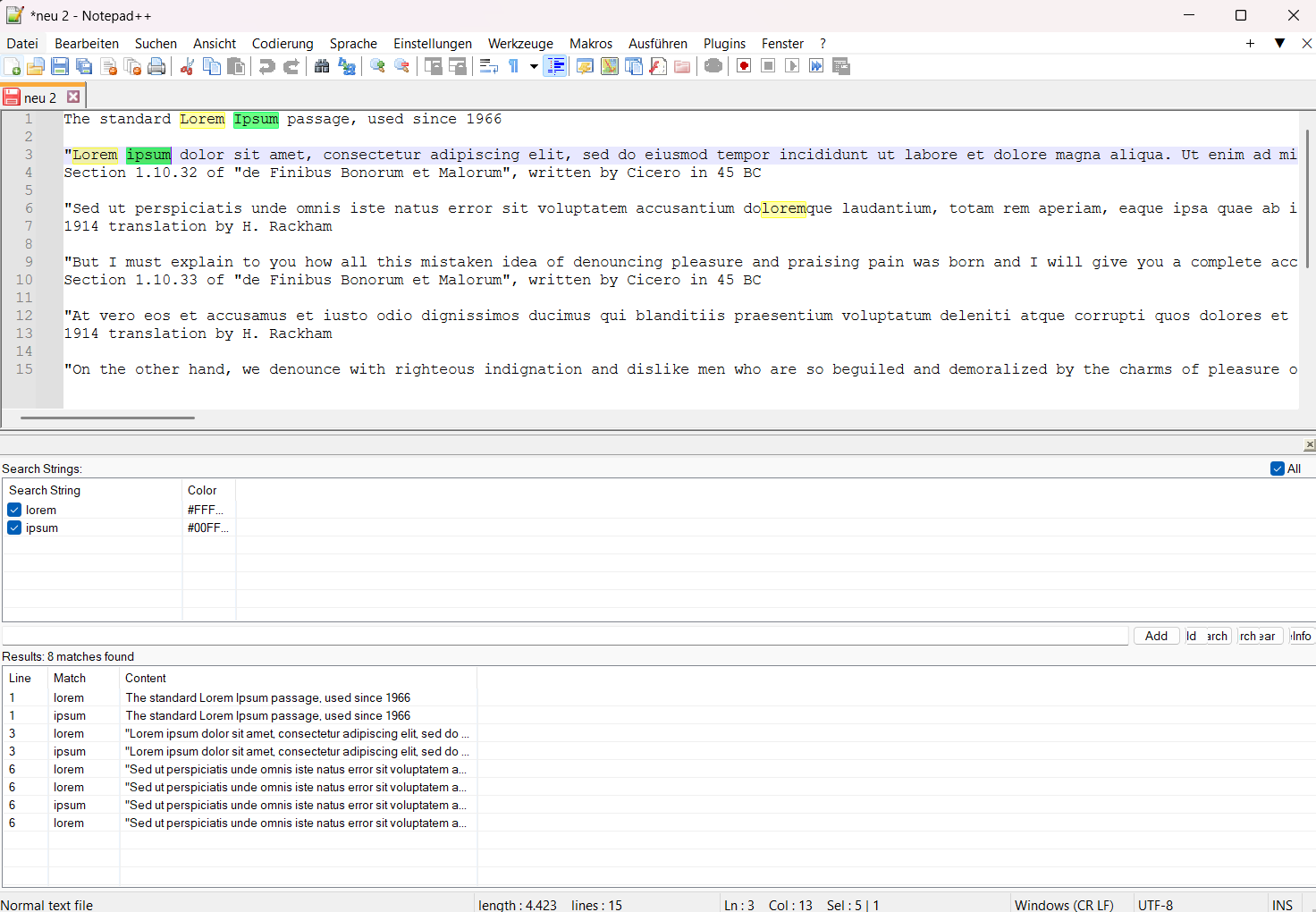
MultiSearcher adds multi-term search to Notepad++: define a list of search terms and highlight several at the same time in your document – each term in its own color. Perfect for analyzing log files, source code, configuration files, or large text files.
Features
- Multi-term search: highlight any number of terms together
- Color highlighting: each term gets its own distinct color
- Results list with line number, term and line content – double-click to jump
- Quick toggling of individual terms via checkbox, or all at once with “All”
- Dockable panel that integrates seamlessly into Notepad++
- Persistent term list across sessions
- On-demand search via button – no distracting live updates
Requirements
- Notepad++ (64-bit) for Windows
- Plugin version 1.0
Installation
- 1Copy MultiSearcher.dll into …\Notepad++\plugins\MultiSearcher\
- 2Restart Notepad++
- 3Open via Plugins → MultiSearcher → Show Panel
Availability
MultiSearcher is free to use and freely available. Built by alceitlabs.