AI Engine Diagnostics

HEAR WHAT YOUR ENGINE IS TELLING YOU

Record engine sounds with your phone. EngineEar AI analyses the recording and delivers a structured report — possible causes, urgency level, and next steps — before small sounds become costly repairs.

ACOUSTIC ANALYSIS PROCESSING
URGENCY
LOW
CAUSES
3found
CONFIDENCE
68%
URGENCY LEVEL LOW · MONITOR
Heat shield vibration 68%
Exhaust bracket resonance 24%
Loose engine mount 8%

CAPABILITIES

WHAT ENGINEEAR KNOWS

01
🚗

VEHICLE PROFILE

Enter your vehicle type, make, and context for AI results tailored to your specific engine — not a generic response.

02

URGENCY LEVEL

Every analysis delivers a clear urgency rating — from low (monitor) to critical (stop driving). Know exactly when to act.

03
🔧

MECHANICAL CAUSES

A ranked list of possible mechanical causes based on the acoustic signature — so you walk into the workshop informed.

04
📁

LOCAL ARCHIVE

Your entire analysis history stays on your device. No cloud sync, no account required. Your data goes nowhere.

PROCESS

THREE STEPS TO CLARITY

1

RECORD

Hold your phone near the engine. Start a recording in Guided Mode (with prompts) or Free Mode. No special hardware needed.

2

ANALYSE

Our backend processes the acoustic data with state-of-the-art AI audio analysis. Transcription and pattern recognition in seconds.

3

RESULTS

Receive a structured report directly on your device: possible causes ranked by likelihood, urgency level, and actionable suggestions.

ALWAYS FREE

MY GARAGE

Track every vehicle's history, costs, and service intervals — without a subscription. Everything below works on the free tier. Nothing leaves your device.

01
🚗

VEHICLE PROFILES

Add unlimited vehicles. Track make, model, year, mileage, fuel type, distance unit, and timing-drive details — per vehicle.

02

FUEL LOG

Log every refuel: volume, cost, mileage, notes. See your cost per liter (or gallon) and consumption trends over time.

03
🔧

MAINTENANCE & SERVICE HISTORY

Set recurring intervals (km or months) or mark one-time events. Every Mark-Done creates an editable log entry — full history per item.

04
📊

COST INSIGHTS

Total spend, cost per kilometer, average per month, and a 12-month breakdown of fuel vs. maintenance vs. other. See exactly where your money goes.

05
🛣️

TRIP LOGBOOK

Log private, business or commute trips per vehicle — free forever, no subscription. Fuel entries auto-match by date and mileage. Export CSV or PDF for your tax advisor. Everything local, no GPS, no cloud sync.

Vehicle profile form
Vehicle profile
Analysis archive
Local archive
Archive detail with audio
Archive detail
💾

Backup & Restore included. Pick what to back up (vehicles, analyses + audio, fuel log, maintenance, trip logbook, settings) and save a ZIP via the system file picker. Restore on a fresh install or a new device any time.

PLANS

CHOOSE YOUR PLAN

My Garage stays free. The prices below are for AI analyses only — vehicle profiles, fuel log, maintenance, stats, and backup work without a subscription.
WEEKLY
€3.99
per week · auto-renews
  • 10 analyses / day
  • 20 analyses / week
  • All features included
  • Cancel anytime
BOOSTPACK
Need more analyses right now? One-time purchase — 10 extra analyses added to your account, no expiry.
€3.99 one-time

USER MANUAL

HOW TO USE EVERY FEATURE

Tap a chapter to expand it. Seven topics cover everything from the first launch to the free trip logbook, backup and restore.

A note on accuracy

Recognition quality depends on the microphone. Built-in phone mics roll off the low and high frequencies that carry most of the diagnostic signal, and background noise widens that gap.

Because of that variance, EngineEar AI errs on the side of flagging — sometimes calling out findings a mechanic would shrug at. In a quiet spot with a decent external mic clipped near the engine, the assessments get sharp. Straight from your phone in a windy parking lot, treat individual line items with a grain of salt and trust the overall trend.

Onboarding (first launch)

On first launch you see three intro slides: welcome, how to record an analysis, and a consent screen with a link to this privacy policy. Tap Skip to jump straight to the app, or Next to step through. You'll only see this once.

Microphone permission

The first time you start a recording, Android asks for microphone access. EngineEar AI uses the mic only while you are recording an analysis — never in the background. If you decline, you can re-enable it later under Android Settings → Apps → EngineEar AI → Permissions.

Choosing a subscription

If you try an analysis without an active plan, the subscription wall appears. Weekly (€3.99) and Monthly (€9.99) plans differ only in price and the periodic quotas they unlock. All other features — analyses themselves, garage, archive, settings — work the same on either plan. A one-time Boostpack (€3.99 for 10 extra analyses, no expiry) is available from Settings once you have any active subscription.

Mode selection

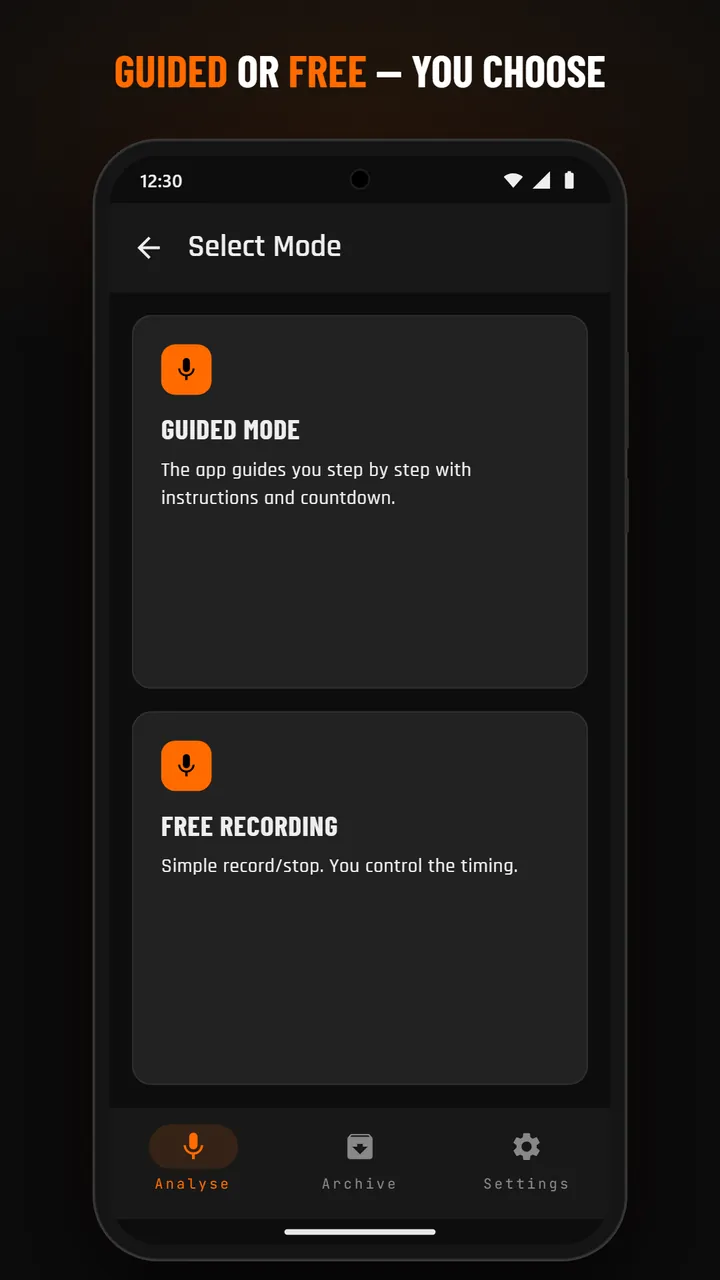
From the home screen tap Analyse, then pick a mode. Guided Mode walks you through a fixed sequence (30 s idle + 20 s revs, 50 s total, with a countdown). Free Mode lets you start and stop manually whenever you want (auto-stops after 90 s).

Guided mode walkthrough

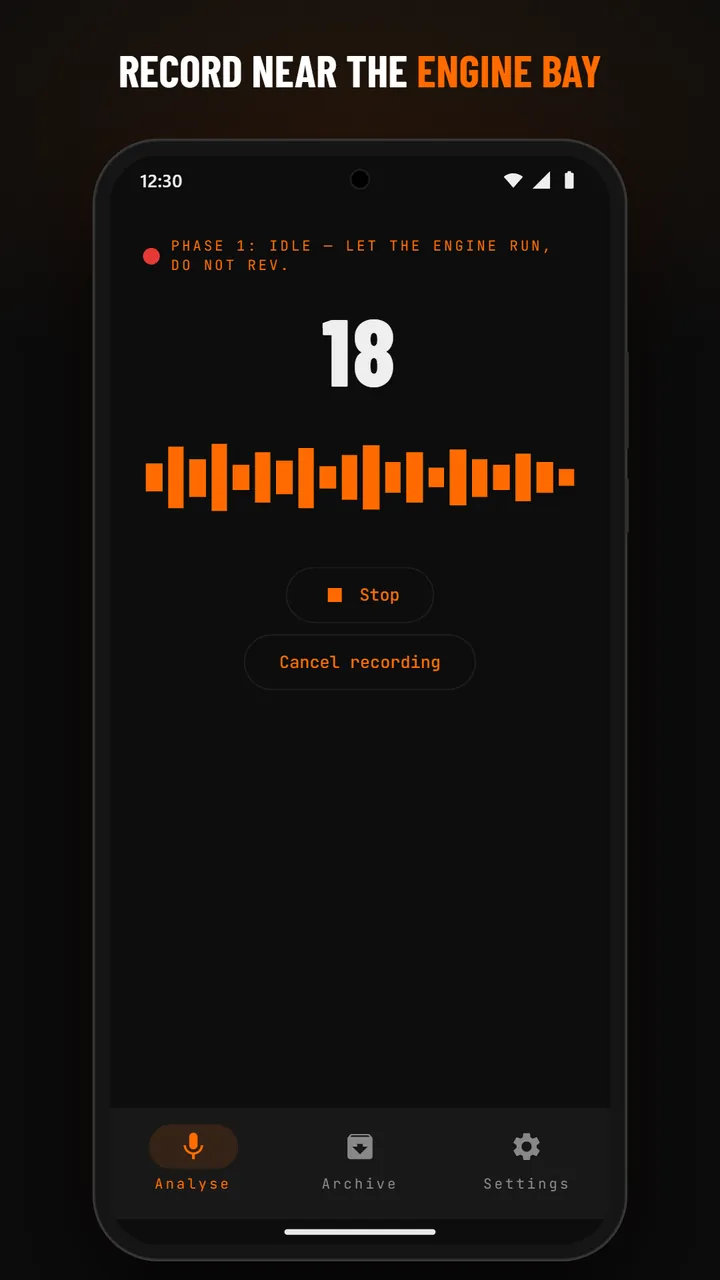
Phase 1 (Idle, 30 s): keep the engine running at idle, no throttle input. The app shows the countdown and a live waveform. Phase 2 (Revs, 20 s): rev the engine smoothly between idle and around 3000 rpm. The recording stops automatically at the 50-second mark and uploads.

Free mode

Tap Start to begin, Stop when done. A duration timer is visible. Try to record at least 30 seconds of usable engine sound for a meaningful analysis.

Background noise warning

If the app detects high ambient noise (wind, traffic, music) it shows a warning banner. You can continue recording, but the analysis may come back as INCONCLUSIVE. Move to a quieter spot for best results.

Cancel + restart

Tap the back arrow at any time to cancel — nothing is saved, no quota consumed. After a successful upload the result lands in your Archive and your daily quota is decremented.

Mode selection
Mode selection
Recording screen
Recording

Urgency levels

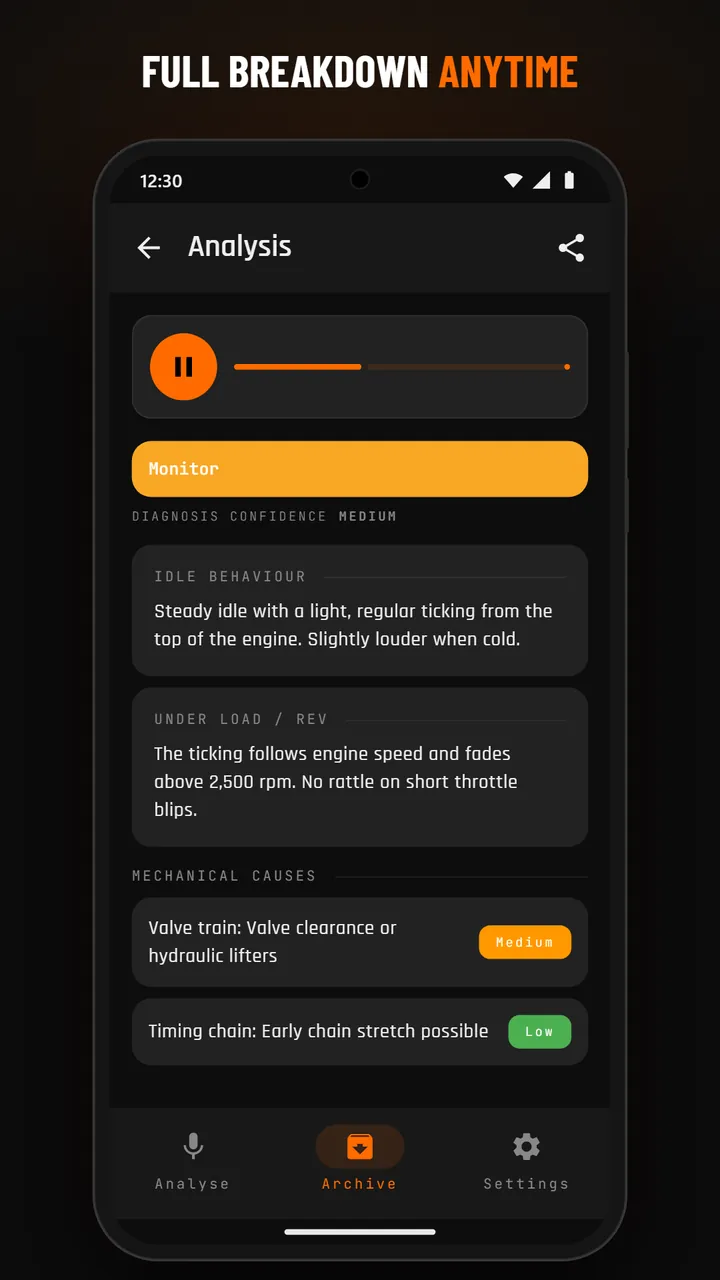
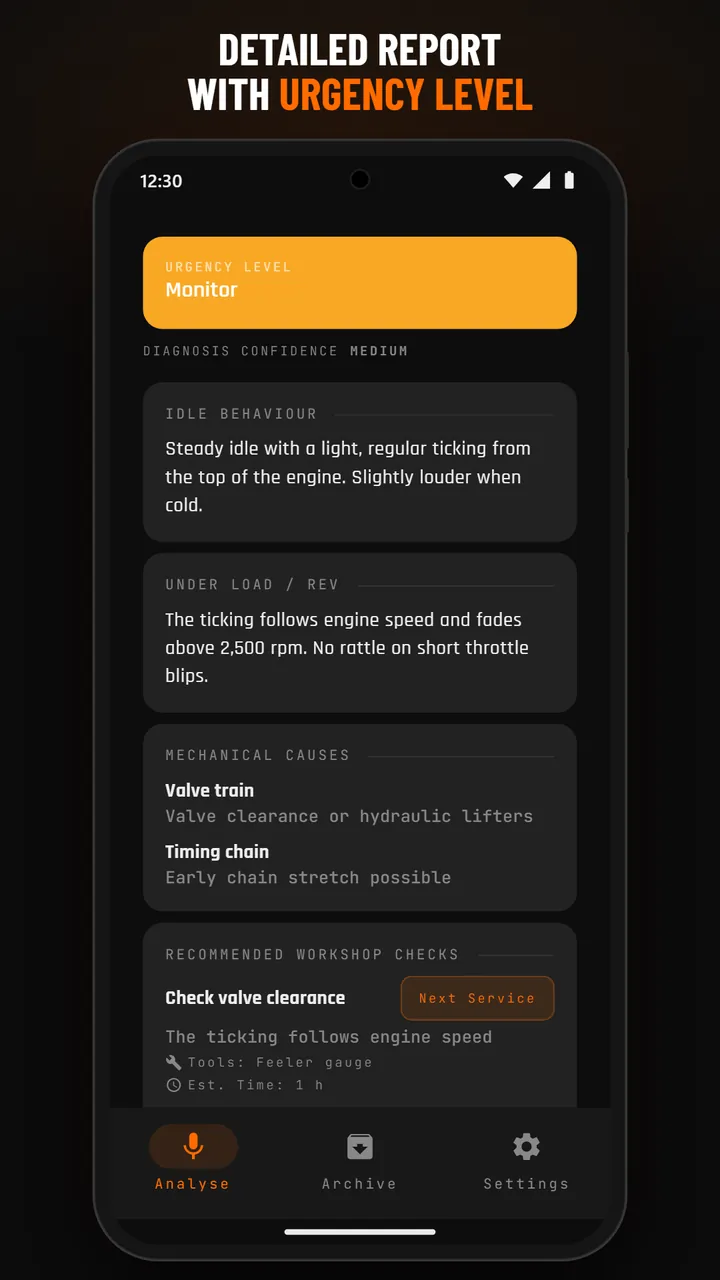
Every result starts with a color-coded urgency banner: NO_CONCERN (green, nothing notable), MONITOR (yellow, watch this), SERVICE_RECOMMENDED (orange, schedule a workshop visit), or IMMEDIATE (red, stop driving and inspect). The banner is your at-a-glance answer; the detail sections explain why.

Idle vs. rev assessment

Two expandable sections describe what the AI heard at idle and under load. Useful when an issue only shows under one condition (e.g. a knock that only appears at higher rpm).

Mechanical causes

A ranked list of possible mechanical causes — most likely first, with a short justification. Treat this as a hypothesis list to bring to a mechanic, not as a final diagnosis.

Recommended checks

Concrete next steps: which component to inspect, what tool is needed, rough time estimate, and an urgency tag (immediate / service / monitor). Designed so you walk into the workshop already informed.

Confidence badge + age evaluation

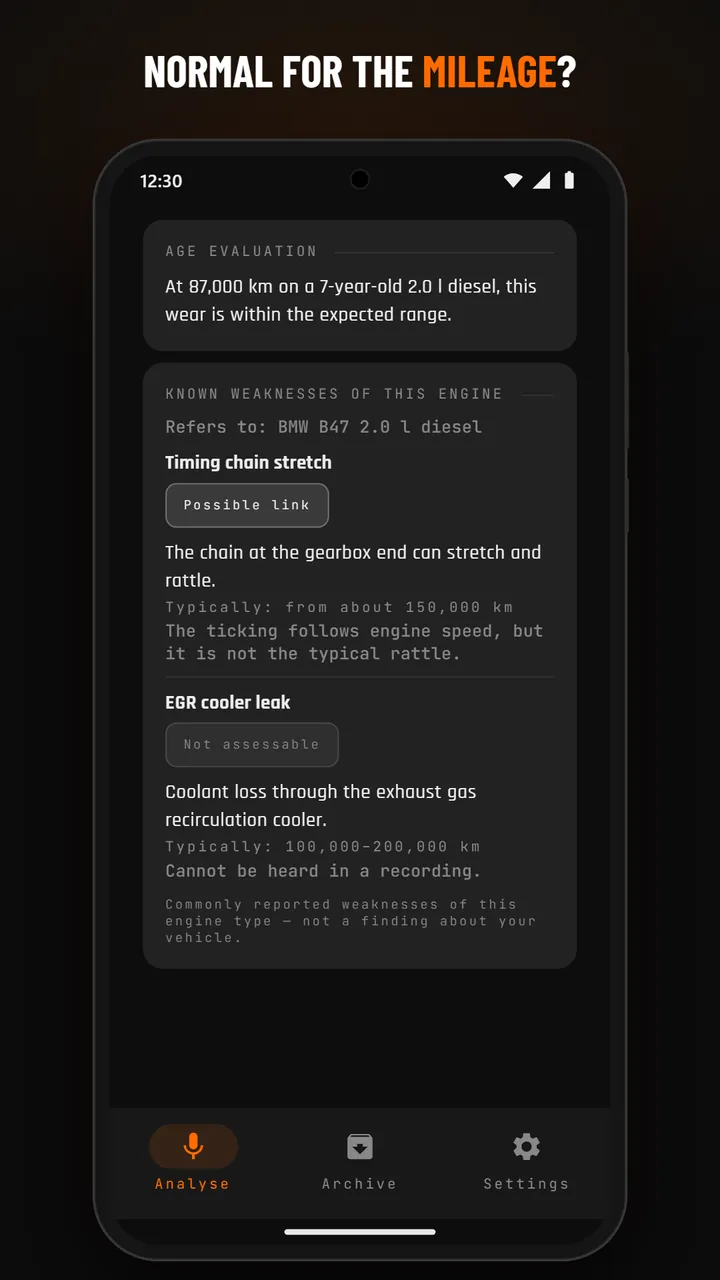
A Confidence badge (High / Medium / Low) reflects how clearly the audio signature mapped to known patterns. Age evaluation contextualizes findings against your vehicle's year and mileage — a worn-sounding engine is interpreted differently for a 5-year-old car than for a 25-year-old one.

INCONCLUSIVE results

Sometimes the AI can't reach a confident conclusion — too short, too quiet, no clear engine signal, or low quality. The result tells you why and suggests a re-record. INCONCLUSIVE results refund the quota so you don't pay for unusable recordings.

Analysis result
Result overview
Wear-detail result
Wear detail

Browsing past analyses

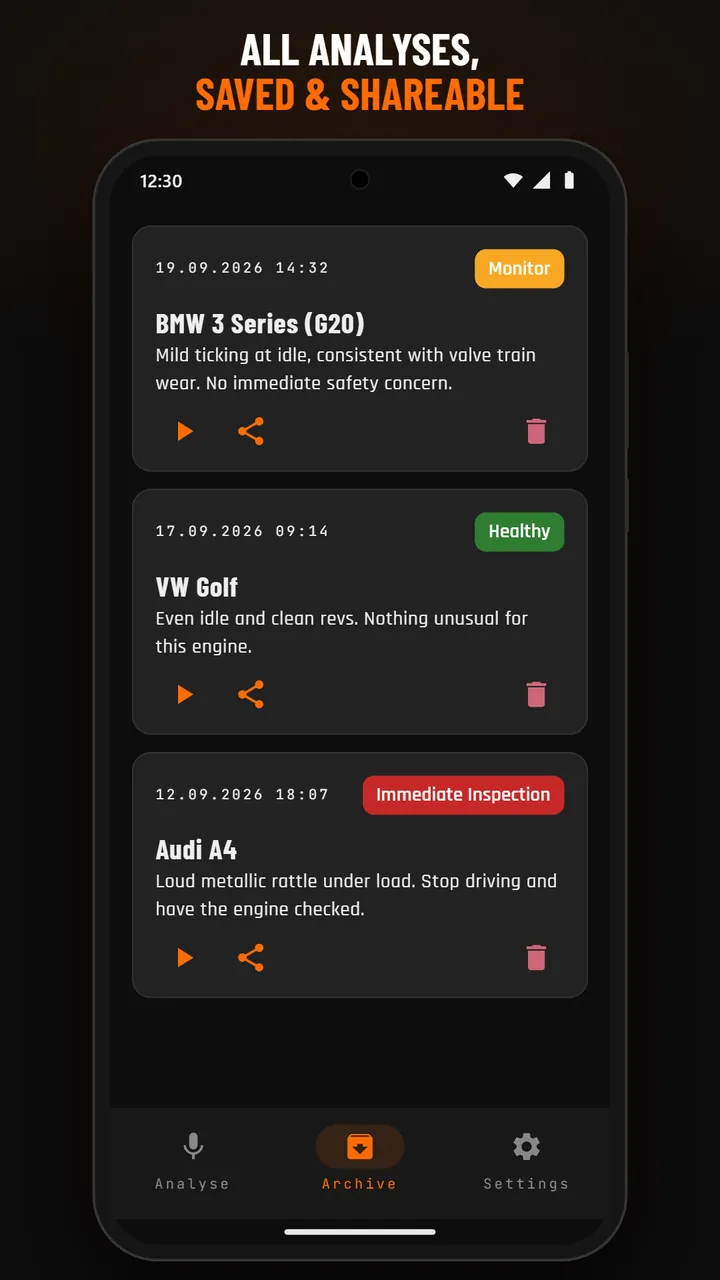
The Archive tab lists every completed analysis newest-first: vehicle name, date, urgency badge, and a one-line summary. Tap any entry for the full detail view.

Re-playing audio

Each archive detail page has an audio player with play/pause and a progress bar. Useful for A/B comparison after a repair: record again, compare both clips.

Sharing results

The Share button on a detail page exports a text summary (vehicle, urgency, key findings) via the system share sheet — email, messenger, whatever. The audio file itself is not shared by default.

Deleting an entry

Open an archive entry, tap the delete icon, confirm. The DB row and the linked audio file are removed from the device. Nothing on the server — audio was never stored there.

Archive list
Archive list
Archive detail
Archive detail

Adding a vehicle

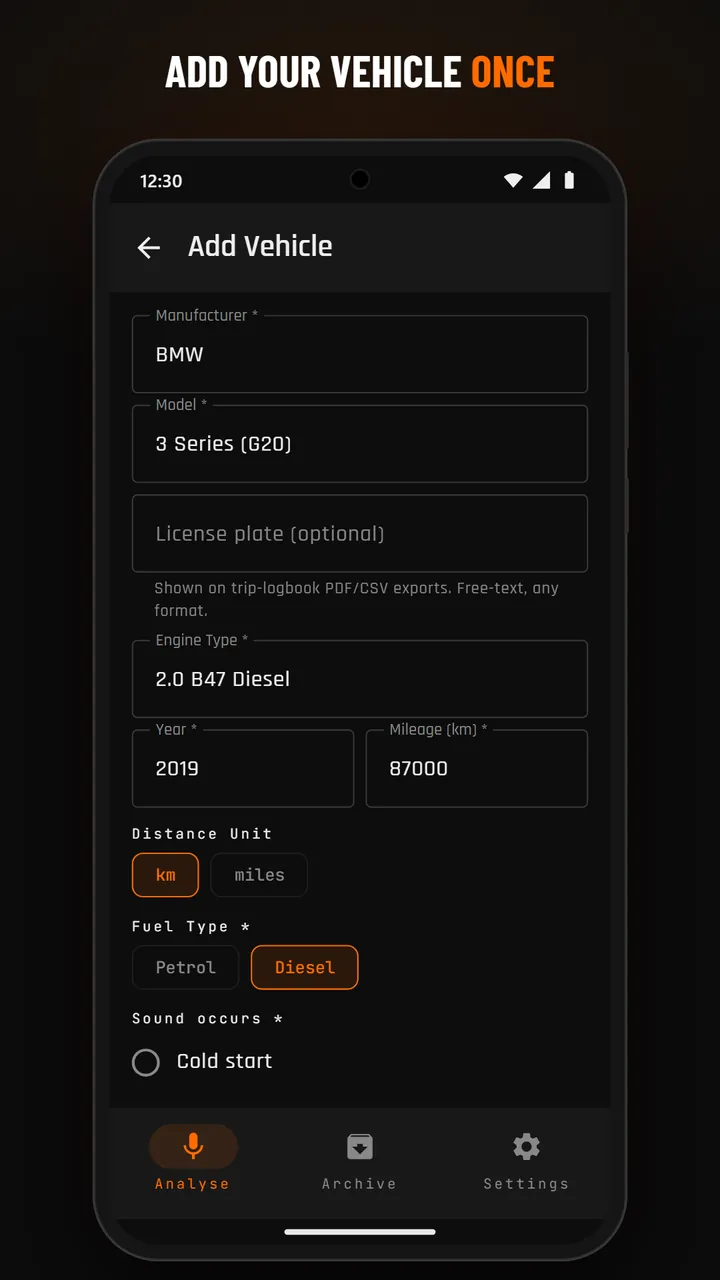
Garage → + Add vehicle. Required fields: manufacturer, model, engine type, year of manufacture (free text, 4 digits), current mileage, distance unit (km / miles), fuel type, sound occurrence, check-engine-light status. Optional (collapsible): license plate (used on tax-relevant trip-logbook exports), last service date (date picker), timing-drive type and replacement mileage.

Multiple vehicles

No limit. The Garage screen lists every vehicle as a card with mileage, fuel type, and any overdue-maintenance badges. Tap a card to open its detail view with four tabs: Profile, Fuel Log, Maintenance, Stats.

Fuel Log

+ Add entry: date, volume (L or gal), total cost, odometer reading, optional notes. Each row shows €/L automatically. Edit or delete past entries by tapping them. The header card sums up total spend and average price.

Maintenance — intervals, one-time, mark done

Add a maintenance item by type (Oil Change, Inspection, Brake Pads, Timing Belt, Custom, …). For recurring items set an interval in km, months, or both — the next due date is calculated from the last completion. For one-off events (e.g. warranty extension, seasonal tire swap) pick type Custom and tick One-time event; interval fields are then disabled. Tap Mark done to log a completion (date, mileage, cost, notes). The item status — OK / DUE_SOON / OVERDUE — is calculated client-side from the latest known mileage and timestamp.

Service history banner

Above the maintenance items list a Service History banner shows every Mark-Done as an editable log entry. Tap the edit icon to change date, mileage, cost or notes; tap delete to remove a single entry without affecting the others. The newest entry per item drives the status calculation.

Stats

The Stats tab combines fuel, maintenance and trip-logbook extra costs (tolls, parking) into one cost view: total spent, cost per kilometer (or mile), average cost per month, and a 12-month stacked bar (fuel vs. maintenance vs. other). The monthly average uses your earliest entry as the starting point and floors at one month so a single fresh entry doesn't inflate the number.

What it is — and why it's free

A digital driver's logbook — the fifth pillar of My Garage alongside Vehicle Profiles, Fuel Log, Maintenance and Stats. Log every trip per vehicle, classify each as Private, Business or Commute, and export a clean CSV or PDF for your tax advisor. Completely free — no subscription required, ever, just like the rest of My Garage. Runs entirely on your device: no GPS tracking, no cloud sync, no account. Useful for the self-employed, freelancers, sales reps and anyone who needs mileage records for tax purposes.

Opening the Trip Logbook

Trip Logbook lives inside the My Garage feature-set, so it's reached the same way as your vehicle data: (a) primary route — Garage → tap a vehicle → Profile tab → the Trips quicklink opens the logbook pre-filtered to that one vehicle. (b) alternative — Settings → Trip Logbook opens the same screen but with all vehicles combined for a cross-vehicle overview. From either view you can add, edit, delete, and export trips.

Logging a trip

Tap the + button. Pick the vehicle (pre-selected when you came from a vehicle view), the purpose chip (Private, Business or Commute), start + end date/time (defaults to now and now+1h), start + end location as free text, and start + end mileage (start defaults to the vehicle's current odometer). For a Business trip an extra Business partner / purpose field appears (required — e.g. "Customer XYZ GmbH"). Optional: free-text notes and an extra-cost field for tolls or parking (fuel is auto-matched separately — see below).

Automatic fuel-entry matching

Fuel-log entries are matched to trips automatically: a fuel entry counts toward a trip if its timestamp falls within the trip's time window or its odometer reading falls within the trip's start/end mileage. So you never have to manually assign fuel to trips — just keep logging your refills as usual and the numbers add up correctly. When one fuel entry matches multiple trips (two trips inside the same tank), the cost is split proportionally by trip distance so totals stay consistent.

Trip detail + manual fuel re-assignment

Tap any trip to see its full detail: all fields plus an Assigned fuel entries section listing every matched refuel with date and cost. If the auto-match got something wrong, use the + button in that section to manually attach a fuel entry, or the × next to an assigned entry to un-assign it. The cost summary at the bottom sums extra costs + assigned fuel costs so you always see a single number per trip.

Deleting a trip (with mileage rollback)

Delete a trip from the list (⋮ menu → Delete → confirm) or from the trip detail screen. If that trip was the one that raised the vehicle's odometer, the app recalculates the vehicle's mileage from the remaining trips + fuel entries so nothing gets stuck at a phantom-high value. Nothing is deleted on any server — trips are local-only anyway.

Editable mileage-allowance rates

Under Settings → Mileage-allowance rates you can adjust the €/km rates the app uses when estimating your tax-deductible allowance. Defaults follow the 2026 German tax code: 0.30 €/km for Business trips, 0.30 €/km for Commute up to 20 km and 0.38 €/km beyond 20 km (with a toggle to disable the 20-km split for countries where it doesn't apply). Override any rate for your own country's rules. Your total estimated mileage allowance appears on every PDF export.

License plate on exports

If you've filled in the optional license plate field on a vehicle (Garage → vehicle → Edit), it appears on every CSV row (new LicensePlate column) and on every PDF (in the report header for single-vehicle exports, and as the group header + subtotal for multi-vehicle exports). Tax authorities and accountants often expect it, so it's the recommended field to fill in even though it's optional.

Exporting to CSV or PDF

From the Trip Logbook tap the 📊 icon in the top bar. Pick a date range (presets: Current month / Last month / Current year / Last year / Custom), optionally filter by vehicle (All / one specific) and by purpose (All / Business only / Private only). Choose format: CSV (semicolon-delimited, UTF-8 with BOM, Excel-DE compatible, locale-aware number formatting) for spreadsheets, or PDF for a printable report with title page, trip table and mileage-allowance summary. Tap Create — the file is generated and you land in the Export History screen with the new file at the top.

Multi-vehicle PDF layout

If the export contains trips for exactly one vehicle, the PDF uses a flat table with the vehicle name and license plate in the header. If it contains trips for multiple vehicles, the PDF automatically switches to a grouped-by-vehicle layout: each vehicle gets its own subheader (name + plate), a chronological trip table, and a subtotal (trips / distance / fuel cost / other cost). A grand total closes the report. This is the layout German tax advisors expect for multi-car self-employed use — clean handoff, no manual re-sorting.

Export history

Every CSV/PDF you generate is kept in an in-app Export History (Trip Logbook → ⋮ menu → Export History). Each entry shows format badge, date range, generation time and file size. Tap Open to re-view a file in the system PDF/CSV viewer, Share to send it via email or messenger, or Delete to remove it from the device. Files are stored in the app's private files directory (filesDir/exports/), so they survive app updates but never leak to other apps unless you actively share them.

Not GoBD-certified — read this

EngineEar AI's trip logbook is a personal record — trips remain editable and deletable at any time. It is not GoBD-certified, so it does not offer the tamper-proof audit trail that German tax law requires for a fully compliant electronic driver's logbook ("ordnungsgemäßes Fahrtenbuch"). For daily tax preparation and routine consultations with your tax advisor, most self-employed users find it sufficient — but for a tax audit that specifically requires certified GoBD compliance, always consult your tax advisor first. A GoBD-compliant mode with immutability is a planned future feature.
Currency, volume unit, language

Currency: 50+ ISO codes bundled (EUR, USD, GBP through AED, SAR, ZAR, THB, SGD, KRW). If your currency isn't in the list, tap Other currency… and enter any 3-letter code + optional custom symbol — everything you type is remembered. Affects every price display in the app. Volume unit: liters or gallons — affects fuel log entry and consumption math. Language: follows your Android system language by default; 25 locales bundled (added zh-CN, es-419, pt-BR and th in v1.5.1). Distance unit (km vs. miles) is configured per vehicle, not globally.

Mileage-allowance rates

Settings → Mileage-allowance rates lets you customise the €/km rates the Trip Logbook uses when it estimates your tax-deductible allowance. Defaults are the 2026 German tax code (0.30 €/km business, 0.30 €/km commute up to 20 km, 0.38 €/km beyond 20 km, with a toggle to disable the 20-km split for countries where it doesn't apply). Override any of the three rates for your own country. Your total estimated allowance appears on the PDF export. Changes are saved locally and travel with your Backup.

Backup & Restore

Settings → Backup and restore. Tick what to include (Vehicle profiles, Analyses + audio recordings, Fuel log, Maintenance + history, Trip logbook, Generated exports (PDF/CSV files from the Trip Logbook), App preferences incl. mileage rates + custom currency). Tap Create backup: the Android system file picker appears — choose a destination (Google Drive, Downloads, USB, anywhere). A signed ZIP is written including a manifest.json with counts. To restore, tap Choose backup file, pick the ZIP, confirm the preview dialog. Restore replaces all current data and the app fully restarts itself afterwards (the process is killed and re-launched clean, so no stale state from before the restore lingers).

Privacy controls

Settings → Manage data sharing opens two independent toggles: Crashlytics (opt-out, default ON, legitimate interest) and Analytics (opt-in, default OFF, explicit consent). Disabling either stops all further collection within one app launch. Re-granting the LLM analysis consent is also done from this section.

Manage subscription

Settings shows your active plan, purchase date, and expiry. Restore subscription re-syncs from the Play Store — useful after a device switch. To cancel, use the Google Play Store app (Settings → Subscriptions). Cancellation takes effect at the end of the billing period; you keep access until then.

Rate the app

Settings → Rate app opens the Play Store listing directly. Honest reviews — good or bad — are the most useful thing you can do for a small indie app.

⚠️
AI Disclaimer. EngineEar AI provides informational assessments only. Results are based on acoustic pattern analysis and are not a professional vehicle diagnosis. Always consult a qualified mechanic for any safety-critical decisions. Do not solely rely on EngineEar AI results when deciding whether a vehicle is safe to drive.

PRIVACY

YOUR DATA, YOUR CONTROL

EngineEar AI is the provider of the EngineEar AI mobile application. For privacy-related matters, contact us at: mail@alceitlabs.com

  • Audio recordings: Captured locally on your device and transmitted to our backend for analysis. Audio is deleted immediately after processing and is never stored permanently on our servers.
  • Anonymous device UUID: A randomly generated identifier created on first launch. Stored in EncryptedSharedPreferences on your device and not linked to any personal identity.
  • Usage metadata: We track analysis count per time window (10/day, 20/week, 50/month) and subscription status for enforcing usage limits.

Legal basis: Article 46 GDPR — we use Standard Contractual Clauses (SCC) with our external AI service provider (USA) for transfers outside the EEA.

Audio is transmitted to the AI service provider via HTTPS exclusively for analysis and is deleted immediately after the API response. No audio is retained by the AI service provider when using the API in this way.

We use two Firebase services with different legal bases. Both can be reviewed and changed at any time under Settings → Privacy → Manage data sharing.

Firebase Crashlytics — legitimate interest (Art. 6(1)(f) GDPR), opt-out. Crash stack traces, device model, OS version, app version, breadcrumb logs (WARN/ERROR level), Firebase Installation ID. No personal data, no audio, no analysis content. Default: ON. App-stability diagnostics are in the legitimate interest of both us (we can fix bugs before they hurt users) and you (a more reliable app). You can opt out at any time.

Firebase Analytics — explicit consent (Art. 6(1)(a) GDPR), opt-in. Anonymized usage events (screen views, button taps, feature interactions like vehicle_added, analysis_submitted), Android Advertising ID. No personal data, no audio, no analysis content. Default: OFF. We send nothing until you explicitly enable it.

Processor: Google LLC (USA) / Google Ireland Ltd. Transfer basis: Standard Contractual Clauses (SCC) under Article 46 GDPR for transfers to the USA. Retention: up to 90 days at Firebase, then automatic deletion. Withdrawal: disabling either toggle stops all further collection within one app launch.

Payments are handled entirely by Google. EngineEar AI receives only a purchase token — we do not receive or store any payment card data.

The following data is stored locally on your device via our Room database (internal storage only). There is no cloud synchronisation of any of this data:

  • Analysis results (history of past analyses)
  • Vehicle profiles (manufacturer, model, year, fuel type, timing-drive type, current mileage)
  • Fuel log entries (date, mileage, volume, total cost per refuel)
  • Maintenance items + completion history (per-vehicle service schedule and last-done dates)
  • App preferences (selected language, currency, volume unit)

These local features — collectively “My Garage” — are fully available without an active subscription and remain usable even after a subscription expires. Only new AI analyses and boostpack purchases require an active subscription.

Usage limits are enforced server-side:

  • 10 analyses per day
  • 20 analyses per week
  • 50 analyses per month
  • Grant: Consent is requested via an in-app modal before the first analysis.
  • Revocation: You can revoke consent at any time in Settings → Revoke Consent. Revocation stops all future audio transfers.

For privacy questions or requests: mail@alceitlabs.com — Last updated: May 26, 2026.

TERMS

TERMS OF SERVICE

These Terms of Service govern the use of the EngineEar AI mobile application (the "App") provided by EngineEar AI (the "Provider"). By installing, registering, or using the App, you accept these Terms in full.

Contact: mail@alceitlabs.com

EngineEar AI provides an AI-based analysis of engine sounds recorded via your smartphone. The App returns a structured report with possible causes, an urgency level, and recommended next steps.

The analysis is informational only and does not replace professional diagnosis by a qualified mechanic. The Provider assumes no liability for damage, loss, or costs resulting from actions taken based on App output.

The App offers paid subscriptions (weekly or monthly) processed exclusively through Google Play Billing. Prices, billing periods, and renewal terms are shown in the Google Play purchase dialog before you confirm the purchase.

  • Auto-renewal: Subscriptions renew automatically at the end of each billing period unless cancelled at least 24 hours before renewal via your Google Play account.
  • Cancellation: You can cancel anytime under Google Play → Payments & subscriptions → Subscriptions. Access remains until the end of the current paid period.
  • Refunds: Refunds are governed by Google Play's refund policy.
  • Consumable purchases (Boostpack): One-time purchases that grant additional analyses. Boostpacks require an active subscription and are non-refundable once consumed.

Usage is limited per subscription plan. Limits are enforced server-side and reset automatically at the start of each period (daily, weekly, monthly, all UTC).

  • Weekly plan: 10 analyses per day, 15 analyses per week.
  • Monthly plan: 10 analyses per day, 15 analyses per week, 50 analyses per month.
  • Boostpack: 20 additional analyses per purchase.
  • Use the App only for its intended purpose — the analysis of engine sounds on vehicles you own or have permission to record.
  • Do not attempt to reverse-engineer, decompile, or bypass any technical protection measures (including usage limits or authentication).
  • Do not use the App for unlawful, fraudulent, or malicious purposes.
  • Do not abuse the service through automated requests, bots, or by sharing subscription access across multiple unauthorised devices.

All rights to the App, including software, AI models, text, graphics, and branding, remain with the Provider. You receive a non-exclusive, non-transferable, revocable licence to use the App for the duration of your subscription and in accordance with these Terms.

The Provider strives to keep the App available but does not guarantee uninterrupted service. Maintenance windows, third-party service outages (e.g. Google Play or AI providers), or force majeure may cause temporary unavailability.

The Provider may modify features, subscription plans, or these Terms with reasonable notice. Material changes affecting your rights will be communicated in-app or via the Google Play listing.

The App is provided "as is." AI-generated analyses can be inaccurate, incomplete, or misleading. Always consult a qualified mechanic before making repair decisions or continuing to operate a vehicle with suspected mechanical problems.

The Provider's liability is limited to intent and gross negligence. For simple negligence, liability is limited to breach of essential contractual obligations (cardinal duties) and capped at foreseeable, contract-typical damages. Statutory liability for injury to life, body, or health, and under the Product Liability Act remains unaffected.

You may terminate use of the App at any time by cancelling your subscription and uninstalling the App. The Provider may suspend or terminate your access in case of material breach of these Terms (e.g. abuse, fraud, circumvention of technical measures) with immediate effect.

These Terms are governed by the laws of the Federal Republic of Germany, excluding the conflict-of-laws rules and the UN Convention on Contracts for the International Sale of Goods (CISG). Mandatory consumer protection provisions of the country in which you have your habitual residence remain unaffected.

Questions about these Terms: mail@alceitlabs.com — Last updated: April 13, 2026.