AI Engine Diagnostics

HEAR WHAT YOUR ENGINE IS TELLING YOU

Record engine sounds with your phone. EngineEar AI analyses the recording and delivers a structured report — possible causes, urgency level, and next steps — before small sounds become costly repairs.

ACOUSTIC ANALYSIS PROCESSING
URGENCY
LOW
CAUSES
3found
CONFIDENCE
68%
URGENCY LEVEL LOW · MONITOR
Heat shield vibration 68%
Exhaust bracket resonance 24%
Loose engine mount 8%

CAPABILITIES

WHAT ENGINEEAR KNOWS

01
🚗

VEHICLE PROFILE

Enter make, model, engine and power for AI results tailored to your specific engine — the AI also takes the engine services you log in the garage into account.

02
⚡

URGENCY LEVEL

Every analysis delivers a clear urgency rating — from low (monitor) to critical (stop driving). Know exactly when to act.

03
🔧

MECHANICAL CAUSES

A ranked list of possible mechanical causes based on the acoustic signature — plus the weaknesses typical for your engine type — so you walk into the workshop informed.

04
📁

LOCAL ARCHIVE

Your entire analysis history is kept on your device — no sync with our servers, no account required. Only what an analysis needs is sent, and only when you start one.

PROCESS

THREE STEPS TO CLARITY

1

RECORD

Hold your phone near the engine. Start a recording in Guided Mode (with prompts) or as a Free Recording. No special hardware needed.

2

ANALYSE

Our server analyses the recording and measures its acoustic features. An AI model interprets them together with your vehicle's data and logged engine services. Results in seconds.

3

RESULTS

Receive a structured report directly on your device: possible causes ranked by likelihood, urgency level, recommended checks and the known weaknesses of your engine.

ALWAYS FREE

MY GARAGE

Track every vehicle's history, costs and service intervals — without a subscription. Everything below works on the free tier and stays on your device; only when you start an analysis are the engine-related services sent along with it.

01
🚗

VEHICLE PROFILES

Add unlimited vehicles. Track make, model, year, engine power, mileage, fuel type, distance unit and timing-drive details — per vehicle.

02
⛽

FUEL LOG

Log every refuel: volume, cost, mileage, notes. See your cost per liter (or gallon) and consumption trends over time.

03
🔧

MAINTENANCE & SERVICE HISTORY

Set recurring intervals (km or months) or add one-time items — recommended checks from an analysis are added in one tap. Every Mark as done creates an editable log entry — full history per item.

04
📊

COST INSIGHTS

Total spend, cost per kilometer, average per month, and a 12-month breakdown of fuel vs. maintenance vs. other. See exactly where your money goes.

05
🛣️

TRIP LOGBOOK

Log private, business or commute trips per vehicle — free forever, no subscription. Fuel entries auto-match by date and mileage. Export CSV or PDF for your tax advisor. Everything local, no GPS, no cloud sync.

Vehicle profile form
Vehicle profile
Analysis archive
Local archive
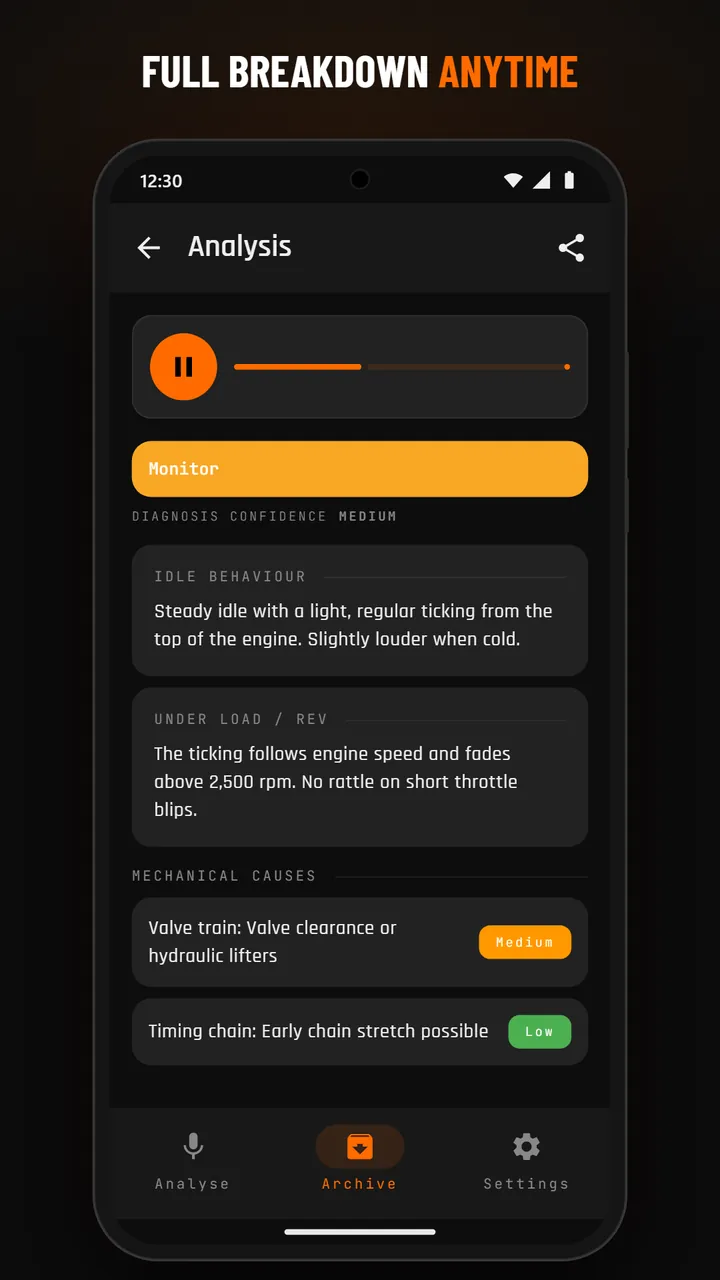
Archive detail with audio
Archive detail
💾

Backup & Restore included. Pick what to back up (vehicles, analyses + audio, fuel log, maintenance, trip logbook, settings) and save a ZIP via the system file picker. Restore on a fresh install or a new device any time.

PLANS

CHOOSE YOUR PLAN

My Garage stays free. The plans below are for AI analyses only — vehicle profiles, fuel log, maintenance, trip logbook, cost stats and backup work without a subscription.
WEEKLY
15 analyses / week
billed weekly · auto-renews
  • Up to 10 analyses a day
  • All features included
  • Cancel anytime
BOOSTPACK
Need more analyses right now? One-time purchase — 50 extra analyses on top of your plan, used once a daily, weekly or monthly limit is reached. No expiry; requires an active subscription.
+50 one-time

Prices in your currency, including any applicable taxes, are shown in Google Play before you buy.

USER MANUAL

HOW TO USE EVERY FEATURE

Tap a chapter to expand it. Seven topics cover everything from the first launch to the free trip logbook, backup and restore.

A note on accuracy

Recognition quality depends on the microphone. Built-in phone mics roll off the low and high frequencies that carry most of the diagnostic signal, and background noise widens that gap.

Because of that variance, EngineEar AI errs on the side of flagging — sometimes calling out findings a mechanic would shrug at. In a quiet spot with a decent external mic clipped near the engine, the assessments get sharp. Straight from your phone in a windy parking lot, treat individual line items with a grain of salt and trust the overall trend.

Onboarding (first launch)

On first launch four intro slides appear: welcome, how an analysis works, More than analysis (the free garage) and an important notice with a link to this privacy policy. Tap Skip to jump straight to the app, or Next to step through. The app then asks whether you want to share crash reports and usage statistics (both stay off unless you switch them on); consent to the AI analysis is asked for separately before your first analysis. You see the slides only once. After an update, a short note on the home screen shows once what is new in that version.

Microphone permission

The first time you start a recording, Android asks for microphone access. EngineEar AI uses the mic only while you are recording an analysis — never in the background. If you decline, you can re-enable it later under Android Settings → Apps → EngineEar AI → Permissions.

Choosing a subscription

If you try an analysis without an active plan, the subscription wall appears. The weekly and the monthly plan differ in price and in the limits they unlock (weekly: up to 10 analyses a day and 15 a week; monthly: additionally up to 50 a month). Everything else — the analyses themselves, garage, archive, settings — works the same on either plan. Google Play shows the prices in your currency. A one-time Boostpack (50 extra analyses, no expiry, used once a limit is reached) is available from Settings once you have an active subscription.

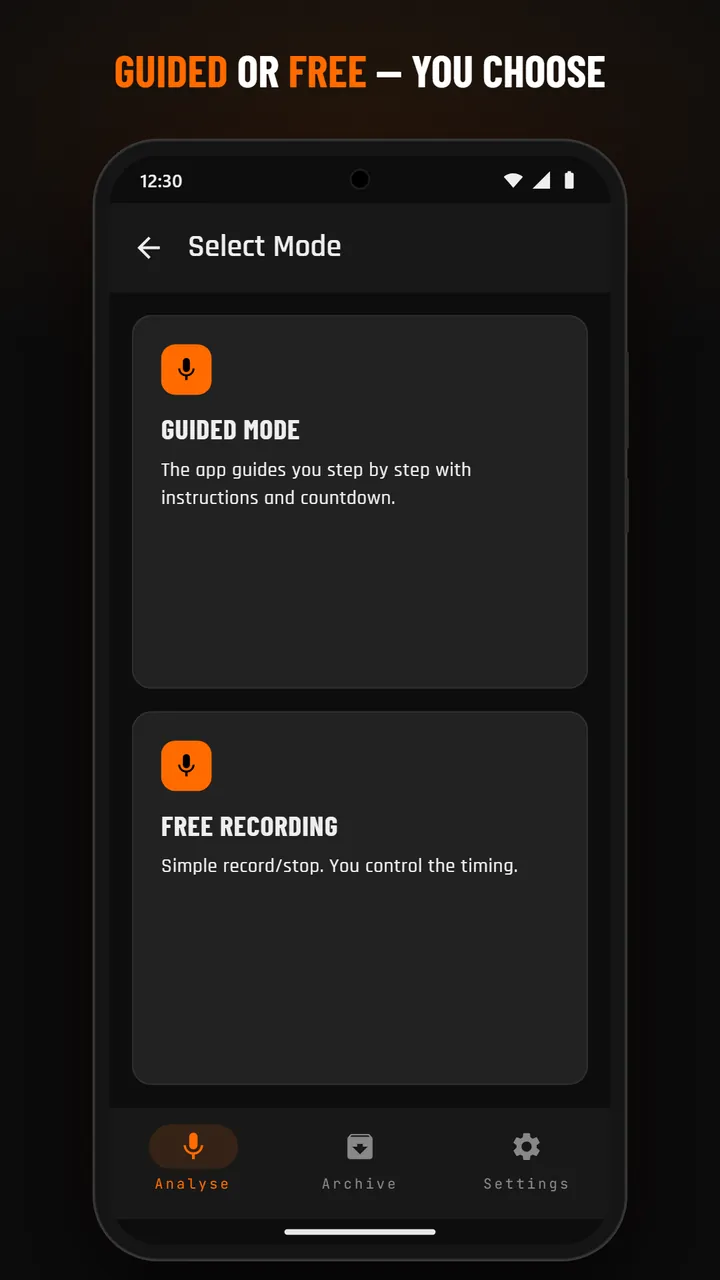
Mode selection

On the Analyse tab pick a vehicle and tap Start analysis, then choose a mode. Guided Mode walks you through a fixed sequence (30 s idle + 20 s throttle bursts, 50 s in total, with a countdown). Free Recording lets you start and stop whenever you want (stops automatically after 90 s).

Guided mode walkthrough

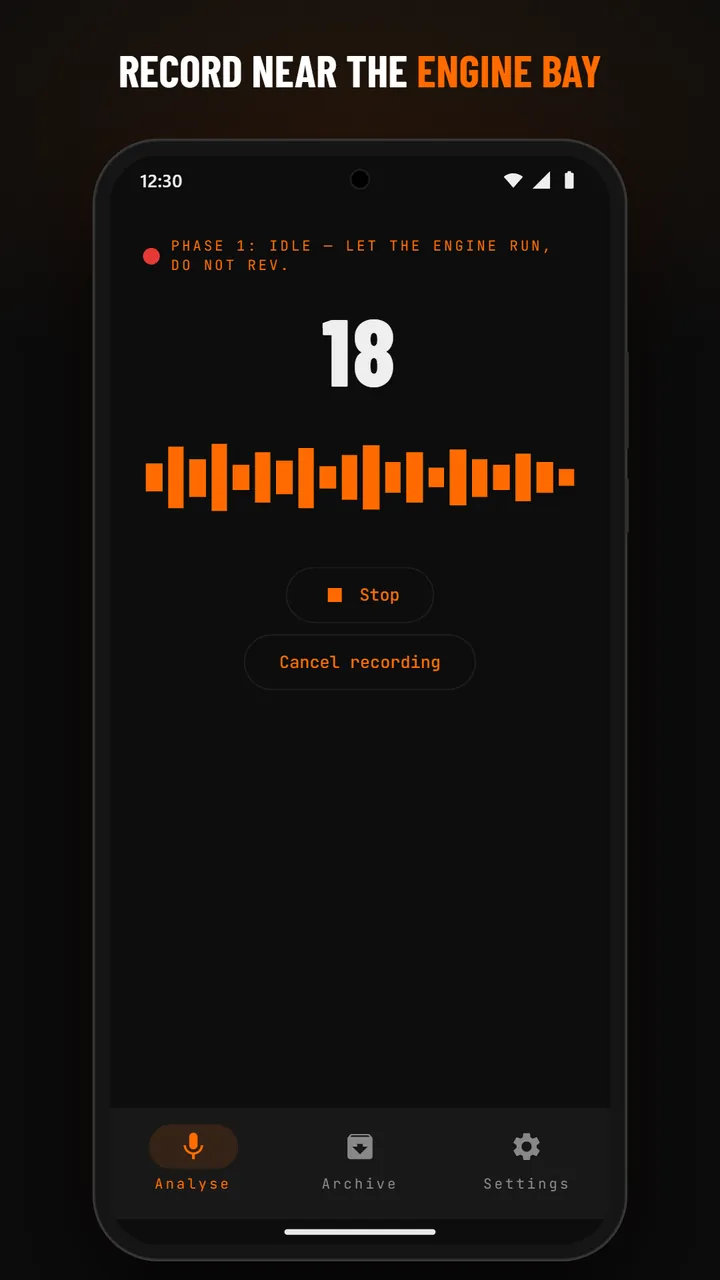
Phase 1 (Idle, 30 s): let the engine run at idle, no throttle. The app shows the countdown and live frequency bars — 20 bands from 50 Hz on the left to 16 kHz on the right, so you can see which frequencies your engine produces. Phase 2 (Throttle bursts, 20 s): give 2–3 short throttle bursts. The recording stops automatically at 50 seconds and uploads.

Free Recording

Tap Start to begin, Stop when done. A duration timer is visible. Try to record at least 30 seconds of usable engine sound for a meaningful analysis.

Background noise warning

If the app detects high ambient noise (wind, traffic, music) it shows a warning banner. You can continue recording, but the analysis may come back as INCONCLUSIVE. Move to a quieter spot for best results.

Cancel + restart

Tap the back arrow at any time to cancel — nothing is saved, no quota consumed. After a successful upload the result lands in your Archive and your daily quota is decremented.

Mode selection
Mode selection
Recording screen
Recording

Urgency levels

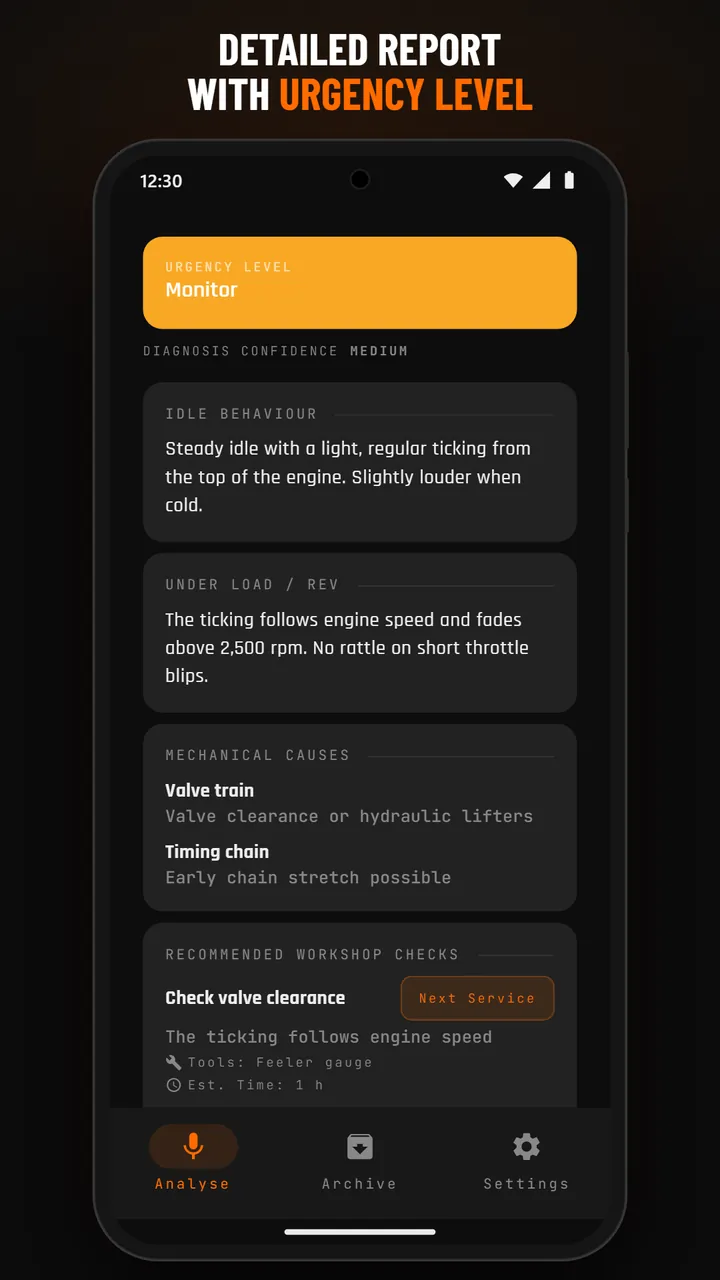
Every result starts with a color-coded urgency banner: No Concern (green, nothing notable), Monitor (yellow, keep an eye on it), Service Recommended (orange, plan a workshop visit) or Immediate Inspection (red, stop driving and have it checked). The banner is your at-a-glance answer; the sections below explain why.

Idle vs. rev assessment

Two expandable sections assess the engine at idle and under load; for guided recordings the two phases are measured separately. Useful when an issue only shows under one condition (e.g. a knock that only appears at higher rpm).

Mechanical causes

A ranked list of possible mechanical causes — most likely first, with a short justification. Treat this as a hypothesis list to bring to a mechanic, not as a final diagnosis.

Recommended checks

Concrete next steps: which component to inspect, what tool is needed, a rough time estimate and an urgency tag (Immediate / Next Service / Monitor). Designed so you walk into the workshop already informed.

Add a check to your service plan

Each recommended check has an Add to service button (for normal results). It opens the dialog for a new service item, already filled in as a one-time item: the check as its name and a note with the date of the analysis and the reason. After saving, the button shows Added with a link View in garage. The item counts as due soon right away; if you allow notifications, a first reminder comes within 24 hours and then every 14 days until you mark it as done. Checks added this way are not sent to the AI with later analyses.

Known weaknesses of this engine

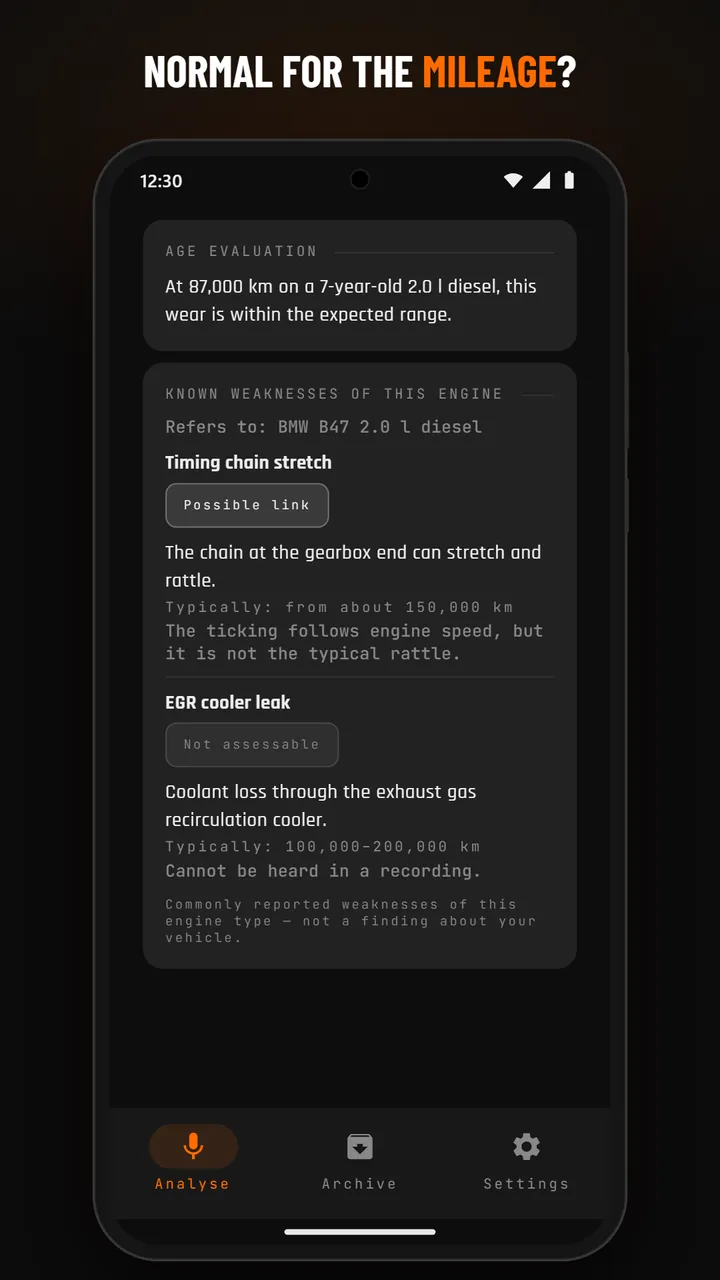
The result also lists weaknesses that are commonly reported for your engine type — with the engine they refer to (Refers to: …), the mileage at which they typically appear and how each one relates to this recording: Fits the finding, Possible link, No sign in this recording or Not assessable. This is general knowledge about the engine type, not a finding about your vehicle. Adding the engine power to your vehicle profile makes it more precise. The block also appears when there is no concern, is shown collapsed for inconclusive results and is part of the archive and the shared text.

Confidence badge + age evaluation

A Confidence badge (High / Medium / Low) reflects how clearly the audio signature mapped to known patterns. Age evaluation contextualizes findings against your vehicle's year and mileage — a worn-sounding engine is interpreted differently for a 5-year-old car than for a 25-year-old one.

INCONCLUSIVE results

Sometimes the AI can't reach a confident conclusion — too short, too quiet, no clear engine signal, or low quality. The result tells you why and suggests a re-record. INCONCLUSIVE results refund the quota so you don't pay for unusable recordings.

Analysis result
Result overview
Wear-detail result
Wear detail

Browsing past analyses

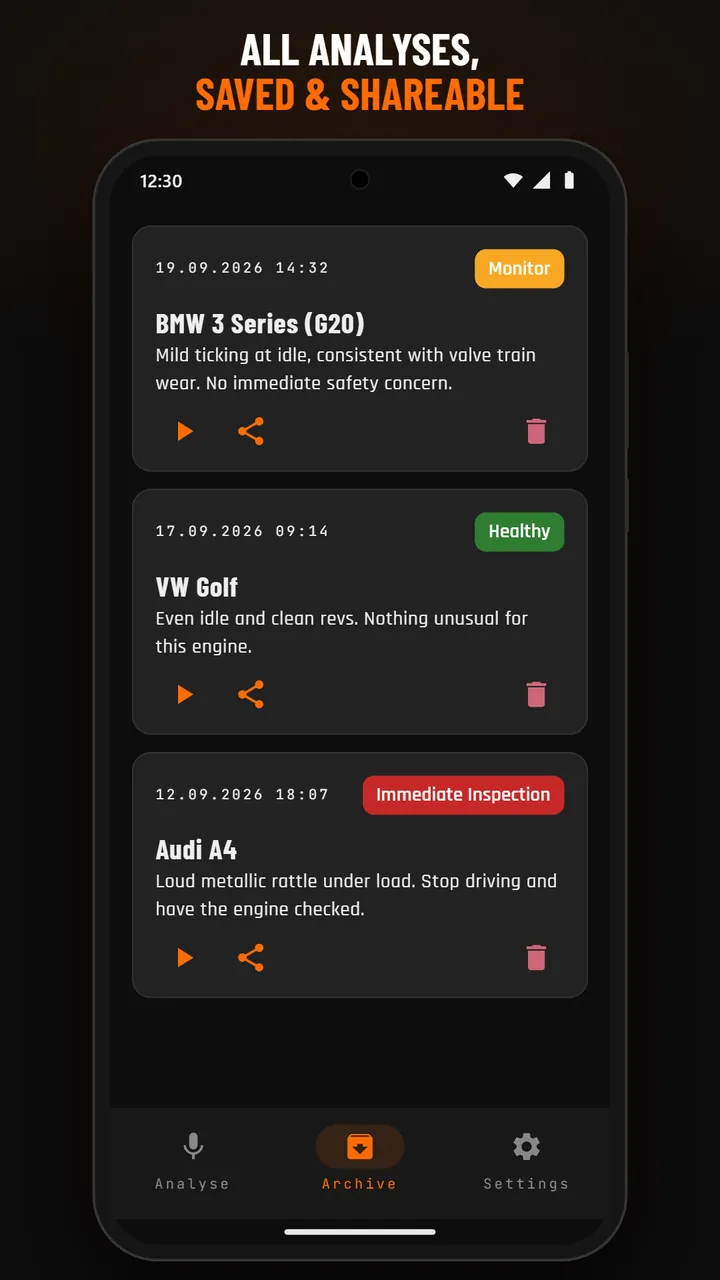
The Archive tab lists every completed analysis newest-first: vehicle name, date, urgency badge, and a one-line summary. Tap any entry for the full detail view.

Re-playing audio

Each archive detail page has an audio player with play/pause and a progress bar. Useful for A/B comparison after a repair: record again, compare both clips.

Sharing results

The Share button on a detail page sends a text summary through the system share sheet — email, messenger, anything. It is laid out for messengers: overall assessment, idle and rev phase, causes, checks, the known weaknesses of the engine and the age evaluation, ending with “Generated by EngineEar AI · alceitlabs.com”. Very long texts are shortened so they fit into one message. Share recording sends the audio file itself.

Deleting an entry

Open an archive entry, tap the delete icon, confirm. The entry and its audio file are removed from your device. The analysis stored on our server (vehicle details and result, see Privacy, section 2) is not affected — we delete it on request; the recording itself was already deleted there once the analysis was complete.

Archive list
Archive list
Archive detail
Archive detail

Adding a vehicle

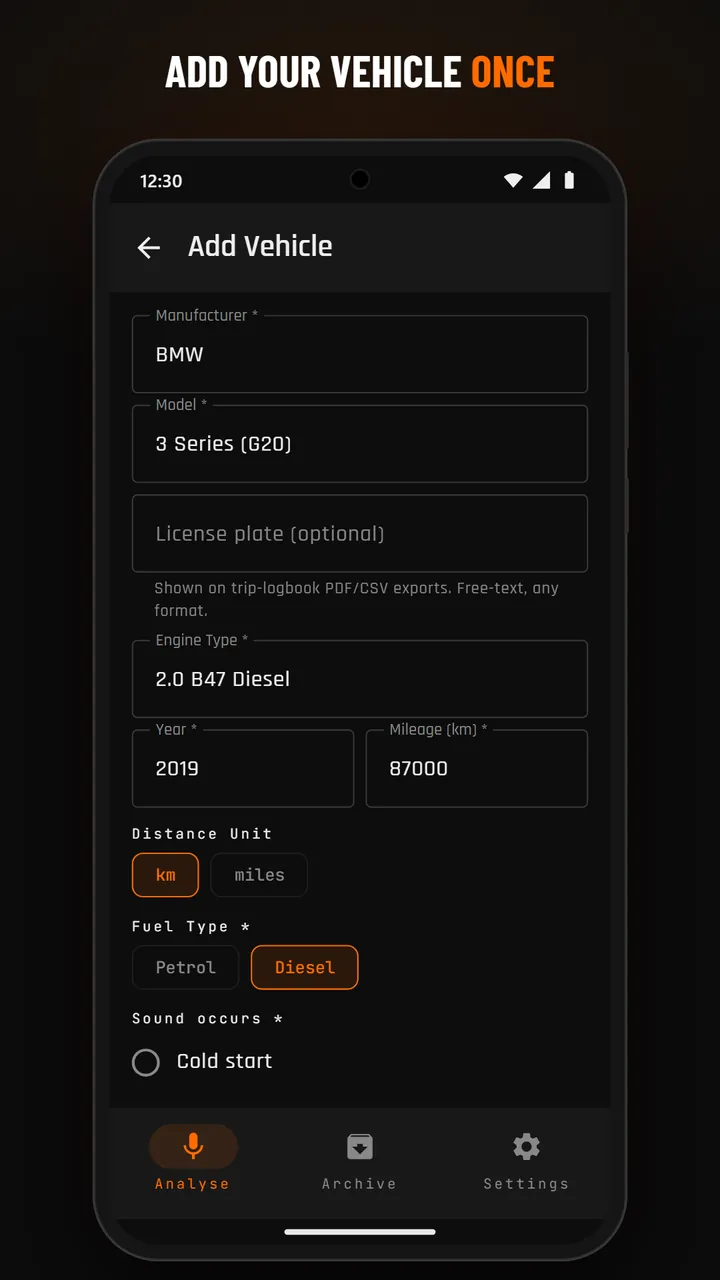
Garage → + Add vehicle. Required fields: manufacturer, model, engine type, year of manufacture (free text, 4 digits), current mileage, distance unit (km / miles), fuel type, sound occurrence, check-engine-light status. Optional: engine power in kW or hp (helps identify your exact engine) and, in the collapsible section, the license plate (used on tax-relevant trip-logbook exports), last service date, timing-drive type and replacement mileage.

Multiple vehicles

No limit. The Garage screen lists every vehicle as a card with mileage, fuel type, and any overdue-maintenance badges. Tap a card to open its detail view with four tabs: Profile, Fuel Log, Maintenance, Stats.

Fuel Log

+ Add entry: date, volume (L or gal), total cost, odometer reading, optional notes. Each row shows the price per liter automatically. Edit or delete past entries by tapping them. The header card sums up total spend and average price. An entry with a higher odometer reading also updates the vehicle's mileage.

Maintenance — intervals, one-time, mark done

Add a maintenance item by type (Oil Change, Inspection, Brake Pads, Timing Belt, Custom, …). For recurring items set an interval in km, months or both — the next due date is calculated from the last completion. For one-off events (e.g. warranty extension, seasonal tire swap) pick type Custom and tick One-time event; the interval fields are then disabled. Recommended checks from an analysis can be added directly (see chapter 3). Tap Mark as done to log a completion (date, mileage, cost, notes); a higher mileage there also updates the vehicle's mileage. The status — OK / due soon / overdue — is calculated on the device from the latest known mileage and date.

Service history banner

Above the list of maintenance items a Service History banner shows every completion as an editable log entry. Tap the edit icon to change date, mileage, cost or notes; tap delete to remove a single entry without affecting the others. The newest entry per item drives the status calculation.

Stats

The Stats tab combines fuel, maintenance and trip-logbook extra costs (tolls, parking) into one cost view: total spent, cost per kilometer (or mile), average cost per month and a 12-month stacked bar (fuel vs. maintenance vs. other). The monthly average starts at your earliest entry and counts at least one month, so a single fresh entry doesn't inflate the number.

What it is — and why it's free

A digital driver's logbook — the fifth pillar of My Garage alongside Vehicle Profiles, Fuel Log, Maintenance and Stats. Log every trip per vehicle, classify each as Private, Business or Commute, and export a clean CSV or PDF for your tax advisor. Completely free — no subscription required, ever, just like the rest of My Garage. Runs entirely on your device: no GPS tracking, no cloud sync, no account. Useful for the self-employed, freelancers, sales reps and anyone who needs mileage records for tax purposes.

Opening the Trip Logbook

Trip Logbook lives inside the My Garage feature-set, so it's reached the same way as your vehicle data: (a) primary route — Garage → tap a vehicle → Profile tab → the Trips quicklink opens the logbook pre-filtered to that one vehicle. (b) alternative — Settings → Trip Logbook opens the same screen but with all vehicles combined for a cross-vehicle overview. From either view you can add, edit, delete, and export trips.

Logging a trip

Tap the + button. Pick the vehicle (pre-selected when you came from a vehicle view), the purpose chip (Private, Business or Commute), start + end date/time (defaults to now and now+1h), start + end location as free text, and start + end mileage (start defaults to the vehicle's current odometer). For a Business trip an extra Business partner / purpose field appears (required — e.g. "Customer XYZ GmbH"). Optional: free-text notes and an extra-cost field for tolls or parking (fuel is auto-matched separately — see below).

Automatic fuel-entry matching

Fuel-log entries are matched to trips automatically: a fuel entry counts toward a trip if its timestamp falls within the trip's time window or its odometer reading falls within the trip's start/end mileage. So you never have to manually assign fuel to trips — just keep logging your refills as usual and the numbers add up correctly. When one fuel entry matches multiple trips (two trips inside the same tank), the cost is split proportionally by trip distance so totals stay consistent.

Trip detail + manual fuel re-assignment

Tap any trip to see its full detail: all fields plus an Assigned fuel entries section listing every matched refuel with date and cost. If the auto-match got something wrong, use the + button in that section to manually attach a fuel entry, or the × next to an assigned entry to un-assign it. The cost summary at the bottom sums extra costs + assigned fuel costs so you always see a single number per trip.

Deleting a trip (with mileage rollback)

Delete a trip from the list (⋮ menu → Delete → confirm) or from the trip detail screen. If that trip was the one that raised the vehicle's odometer, the app recalculates the vehicle's mileage from the remaining trips, fuel entries and maintenance log so nothing gets stuck at a phantom-high value. Nothing is deleted on any server — trips are local-only anyway.

Editable mileage-allowance rates

Under Settings → Mileage-allowance rates you can adjust the €/km rates the app uses when estimating your tax-deductible allowance. Defaults follow the 2026 German tax code: 0.30 €/km for Business trips, 0.30 €/km for Commute up to 20 km and 0.38 €/km beyond 20 km (with a toggle to disable the 20-km split for countries where it doesn't apply). Override any rate for your own country's rules. Your total estimated mileage allowance appears on every PDF export.

License plate on exports

If you've filled in the optional license plate field on a vehicle (Garage → vehicle → Edit), it appears on every CSV row (new LicensePlate column) and on every PDF (in the report header for single-vehicle exports, and as the group header + subtotal for multi-vehicle exports). Tax authorities and accountants often expect it, so it's the recommended field to fill in even though it's optional.

Exporting to CSV or PDF

From the Trip Logbook tap the 📊 icon in the top bar. Pick a date range (presets: Current month / Last month / Current year / Last year / Custom), optionally filter by vehicle (All / one specific) and by purpose (All / Business only / Private only). Choose format: CSV (semicolon-delimited, UTF-8 with BOM, Excel-DE compatible, locale-aware number formatting) for spreadsheets, or PDF for a printable report with title page, trip table and mileage-allowance summary. Tap Create — the file is generated and you land in the Export History screen with the new file at the top.

Multi-vehicle PDF layout

If the export contains trips for exactly one vehicle, the PDF uses a flat table with the vehicle name and license plate in the header. If it contains trips for multiple vehicles, the PDF automatically switches to a grouped-by-vehicle layout: each vehicle gets its own subheader (name + plate), a chronological trip table, and a subtotal (trips / distance / fuel cost / other cost). A grand total closes the report. This is the layout German tax advisors expect for multi-car self-employed use — clean handoff, no manual re-sorting.

Export history

Every CSV/PDF you generate is kept in an in-app Export History (Trip Logbook → ⋮ menu → Export History). Each entry shows format badge, date range, generation time and file size. Tap Open to re-view a file in the system PDF/CSV viewer, Share to send it via email or messenger, or Delete to remove it from the device. Files are stored in the app's private files directory (filesDir/exports/), so they survive app updates but never leak to other apps unless you actively share them.

Not GoBD-certified — read this

EngineEar AI's trip logbook is a personal record — trips remain editable and deletable at any time. It is not GoBD-certified, so it does not offer the tamper-proof audit trail that German tax law requires for a fully compliant electronic driver's logbook ("ordnungsgemäßes Fahrtenbuch"). For daily tax preparation and routine consultations with your tax advisor, most self-employed users find it sufficient — but for a tax audit that specifically requires certified GoBD compliance, always consult your tax advisor first. A GoBD-compliant mode with immutability is a planned future feature.
Currency, volume unit, language

Currency: 50+ ISO codes bundled (EUR, USD, GBP through AED, SAR, ZAR, THB, SGD, KRW). If your currency isn't in the list, tap Other currency… and enter any 3-letter code + optional custom symbol — everything you type is remembered. Affects every price display in the app. Volume unit: liters or gallons — affects fuel log entry and consumption math. Language: follows your Android system language by default, or pick one of the 25 languages under Settings → Language (on Android 13 and later also in the system's app language settings). Distance unit (km vs. miles) is configured per vehicle, not globally.

Mileage-allowance rates

Settings → Mileage-allowance rates lets you customise the €/km rates the Trip Logbook uses when it estimates your tax-deductible allowance. Defaults are the 2026 German tax code (0.30 €/km business, 0.30 €/km commute up to 20 km, 0.38 €/km beyond 20 km, with a toggle to disable the 20-km split for countries where it doesn't apply). Override any of the three rates for your own country. Your total estimated allowance appears on the PDF export. Changes are saved locally and travel with your Backup.

Backup & Restore

Settings → Backup and restore. Tick what to include (Vehicle profiles, Analyses + audio recordings, Fuel log, Maintenance + history, Trip logbook, Generated exports (PDF/CSV files from the Trip Logbook), App preferences incl. mileage rates + custom currency). Tap Create backup: the Android system file picker appears — choose a destination (Google Drive, Downloads, USB, anywhere). A ZIP is written, including a manifest.json with counts. To restore, tap Choose backup file, pick the ZIP, confirm the preview dialog. Restore replaces all current data and the app fully restarts itself afterwards. Consent to the AI analysis is not restored — the app asks for it again before the first analysis. Backups made with this version cannot be restored in app versions up to 1.5.3.

Privacy controls

Settings → Manage data sharing opens two independent toggles: Crash reports and Usage analytics (which also covers performance measurements), both opt-in and OFF by default. Switching one off stops further collection, at the latest from the next app start. Consent to the AI analysis is separate: Revoke consent withdraws it immediately — if the app cannot reach the server at that moment (no connection or an expired subscription), it sends the revocation as soon as it can. To give consent again, tap the consent row under Settings → Privacy, or simply start an analysis: the app asks before uploading.

Manage subscription

Settings shows your active plan, purchase date, and expiry. Restore subscription re-syncs from the Play Store — useful after a device switch. To cancel, use the Google Play Store app (Settings → Subscriptions). Cancellation takes effect at the end of the billing period; you keep access until then.

Rate the app

Settings → Rate app opens the Play Store listing directly. Honest reviews — good or bad — are the most useful thing you can do for a small indie app.

⚠️
AI Disclaimer. EngineEar AI provides informational assessments only. Results are based on acoustic pattern analysis and are not a professional vehicle diagnosis. Always consult a qualified mechanic for any safety-critical decisions. Do not solely rely on EngineEar AI results when deciding whether a vehicle is safe to drive.

PRIVACY

YOUR DATA, YOUR CONTROL

EngineEar AI is the provider of the EngineEar AI mobile application. The controller responsible for processing your data is named in our imprint. For privacy-related matters, contact us at: mail@alceitlabs.com

  • Audio recordings: Recorded on your device, stored there for playback in the archive and transmitted to our server for analysis. There they are analysed and deleted once the analysis is complete — they are not stored permanently and not passed on to third parties; the AI service provider only receives measurements calculated from them (section 3).
  • Vehicle details for the analysis: With each analysis we transmit the details from the selected vehicle profile that the diagnosis needs: manufacturer, model, year, engine, engine power, fuel type, turbo, mileage and its unit, timing-drive type and when it was last replaced, last service, check-engine light and when the noise occurs — plus the app language and the type of recording (guided or free). If you log maintenance in the garage, engine-related work (oil change, inspection, spark plugs, air filter, injectors, timing belt or chain) is included with the mileage at the last time and the distance and months since — no notes, costs or self-named items. The license plate and other profile details are not transmitted.
  • Analyses on our server: We store the vehicle details and the result of each analysis together with your device UUID, so the app can fetch the result and usage limits can be enforced. There is currently no automatic deletion period; we delete this data on request to mail@alceitlabs.com.
  • Device UUID: A random identifier created on first launch and stored in EncryptedSharedPreferences on your device. We do not know your name or email address; on our server the UUID is linked only to your analyses, usage counters, consent record and your purchase from Google Play (section 4).
  • Usage metadata: We count analyses per day, week and month and record your subscription status to enforce the usage limits (section 6).
  • Consent record: Whether and when you gave or revoked your consent to the AI analysis (section 7) — as proof of your consent (Art. 7(1) GDPR).
  • Server logs: Every request from the app reaches our server with your device’s IP address. The web server logs IP address, time, requested path, response status and the name of the app’s network library (user agent) and deletes these logs automatically after 11 days. They serve secure operation and protection against attacks and misuse (Art. 6(1)(f) GDPR). Our server is operated on our behalf by a hosting service provider in Germany under a data processing agreement (Art. 28 GDPR).
  • Legal basis: Transmitting and analysing the recording and vehicle details requires your consent (Art. 6(1)(a) GDPR, section 7). The device UUID, usage counters, purchase check and storing results so the app can fetch them serve the performance of the contract (Art. 6(1)(b) GDPR); the server logs serve our legitimate interest in secure operation (Art. 6(1)(f) GDPR).

What is transferred: Only the vehicle details listed in section 2, the app language and the measurements calculated from the recording (for example spectral centre, loudness and rhythm of the engine noise). The audio recording itself never leaves our server. Your device UUID and other identifiers are not transferred.

Legal basis: Your consent (Art. 6(1)(a) GDPR), requested before your first analysis. The AI service provider, based in the USA, processes the data on our behalf under a data processing agreement (Art. 28 GDPR); for the transfer to the USA we use Standard Contractual Clauses (SCC) under Article 46 GDPR.

The transfer uses HTTPS exclusively. Under the provider’s API terms, data sent through the API is not used to train its models; the provider keeps it for abuse monitoring for up to 30 days, unless the law requires longer retention.

We use three Firebase services, all only with your consent: Crashlytics has its own switch; Analytics and Performance Monitoring share the Analytics switch. Both switches can be reviewed and changed at any time under Settings → Privacy → Manage data sharing.

Firebase Crashlytics — consent (Art. 6(1)(a) GDPR, § 25(1) TDDDG), opt-in. Crash stack traces, device model, OS version, app version, breadcrumb logs (WARN/ERROR level), Firebase Installation ID. No names or email addresses, no audio, no analysis content. Default: OFF. Crash reports are only sent once you enable them in the post-onboarding dialog or in the settings.

Firebase Analytics and Performance Monitoring — explicit consent (Art. 6(1)(a) GDPR, § 25(1) TDDDG), opt-in. Usage events (screen views, button taps, feature interactions like vehicle_added, analysis_submitted; for a finished analysis only its outcome and urgency level) and performance measurements (app start time, screen rendering, duration and size of requests to our server), each with device model, OS version, app version and Firebase Installation ID. No advertising ID, no names or email addresses, no audio, no analysis texts. Default: OFF. We send nothing until you explicitly enable it.

Processor: Google LLC (USA) / Google Ireland Ltd. Transfer basis: Standard Contractual Clauses (SCC) under Article 46 GDPR for transfers to the USA. Retention: up to 90 days at Firebase, then automatic deletion. Withdrawal: switching a toggle off stops all further collection, at the latest from the next app start; for immediate deletion of data already at Firebase write to mail@alceitlabs.com.

Payments are handled entirely by Google; we do not receive or store any payment card data. The app sends us the purchase token from Google Play. Our server checks it with Google and stores the product, subscription status, expiry date, auto-renewal and Google’s order number together with your device UUID — to unlock analyses and enforce the usage limits (Art. 6(1)(b) GDPR).

The following data is stored locally on your device in the app’s private storage (database and files). None of it is synchronised with our servers:

  • Analysis results (history of past analyses, including recommended checks and the known weaknesses of the engine)
  • Audio recordings of your analyses (for playback in the archive)
  • Vehicle profiles (manufacturer, model, year, engine power, fuel type, timing-drive type, current mileage, optional license plate)
  • Fuel log entries (date, mileage, volume, total cost per refuel)
  • Maintenance items + completion history (per-vehicle service schedule and last-done dates)
  • Trip logbook entries (see below)
  • Generated exports (CSV/PDF files you create from the trip logbook, kept in app-internal storage until you delete them)
  • App preferences (language, currency and custom symbol, volume unit, mileage-allowance rates, export-history limit)

For an analysis, only the vehicle details listed in section 2 are transmitted; what our server stores is described there as well.

These local features — collectively “My Garage” — are fully available without an active subscription and remain usable even after a subscription expires. Only new AI analyses and boostpack purchases require an active subscription.

Backup and restore: Under Settings → Backup and restore you can save the data above as a ZIP file to a place you choose in the Android file picker (e.g. Google Drive, Downloads, USB). The file goes directly to that place — not via our servers. Restore reads it back on a new installation or device; consent to the AI analysis is not restored and is asked for again before the first analysis. Android backup: If you have switched on Android’s own backup to your Google account, Android may include this app data in that backup — except the device UUID and your consents. We have no access to that backup; you control it in the Android settings.

Trip logbook: Trips (date and time, start and end location as free text, odometer readings, purpose, optional business partner, notes, extra costs) are stored on your device and never transmitted to us. The app does not use GPS or location services. CSV/PDF exports leave the device only when you share them yourself. The logbook is not GoBD-certified.

Usage limits are enforced server-side:

  • Weekly plan: up to 10 analyses per day and 15 per week
  • Monthly plan: up to 10 analyses per day, 15 per week and 50 per month
  • Boostpack: 50 additional analyses per purchase, used once a limit is reached, no expiry (buying one requires an active subscription)
  • Without an active subscription: no analyses — My Garage stays fully usable
  • Grant: Consent is requested in the app before the first analysis — and again after a restore on a new installation.
  • Revocation: You can revoke consent at any time under Settings → Revoke consent. It takes effect in the app immediately: no recordings, vehicle details or measurements are transmitted any more. If the app cannot reach our server at that moment (no connection or an expired subscription), it sends the revocation as soon as it can. The revocation does not affect the lawfulness of processing before it.
  • You have the right to access your data (Art. 15 GDPR), to rectification (Art. 16), erasure (Art. 17), restriction of processing (Art. 18) and data portability (Art. 20).
  • You may object to processing based on legitimate interests (Art. 21 GDPR) and withdraw a consent at any time with effect for the future (Art. 7(3) GDPR).
  • You have the right to lodge a complaint with a data protection supervisory authority (Art. 77 GDPR), in particular in the EU member state of your habitual residence.
  • To exercise your rights, write to mail@alceitlabs.com. Because we do not know your name, please include the order number from your Google Play receipt (it starts with “GPA.”) so that we can find the data that belongs to you. Most of your data is stored only on your device — you can view, change or delete it there at any time, and uninstalling the app removes it.

For privacy questions or requests: mail@alceitlabs.com — Last updated: September 29, 2026.

TERMS

TERMS OF SERVICE

These Terms of Service govern the use of the EngineEar AI mobile application (the “App”) provided by EngineEar AI (the “Provider”; details in the imprint). By installing or using the App, you accept these Terms in full. No registration or account is required.

Contact: mail@alceitlabs.com

EngineEar AI provides an AI-based analysis of engine sounds recorded with your smartphone. The App returns a structured report with possible causes, an urgency level, recommended next steps and the weaknesses commonly reported for the engine type. The garage features (vehicle profiles, fuel log, maintenance, trip logbook, cost statistics, backup) are free of charge and work without a subscription.

The analysis is informational only and does not replace professional diagnosis by a qualified mechanic. The known weaknesses are general information about the engine type, not a finding about your vehicle. The Provider assumes no liability for damage, loss, or costs resulting from actions taken based on App output.

The App offers paid subscriptions (weekly or monthly) processed exclusively through Google Play Billing. Prices, billing periods, and renewal terms are shown in the Google Play purchase dialog before you confirm the purchase.

  • Auto-renewal: Subscriptions renew automatically at the end of each billing period unless cancelled at least 24 hours before renewal via your Google Play account.
  • Cancellation: You can cancel anytime under Google Play → Payments & subscriptions → Subscriptions. Access remains until the end of the current paid period.
  • Refunds: Refunds are governed by Google Play's refund policy.
  • Consumable purchases (Boostpack): One-time purchases that grant additional analyses. Boostpacks require an active subscription and are non-refundable once consumed.

Usage is limited per subscription plan. Limits are enforced server-side and reset automatically at the start of each period (daily, weekly, monthly, all UTC).

  • Weekly plan: 10 analyses per day, 15 analyses per week.
  • Monthly plan: 10 analyses per day, 15 analyses per week, 50 analyses per month.
  • Boostpack: 50 additional analyses per purchase, used once a limit is reached.
  • Use the App only for its intended purpose — the analysis of engine sounds on vehicles you own or have permission to record.
  • Do not attempt to reverse-engineer, decompile, or bypass any technical protection measures (including usage limits or authentication).
  • Do not use the App for unlawful, fraudulent, or malicious purposes.
  • Do not abuse the service through automated requests, bots, or by sharing subscription access across multiple unauthorised devices.

All rights to the App, including software, AI models, text, graphics, and branding, remain with the Provider. You receive a non-exclusive, non-transferable, revocable licence to use the App in accordance with these Terms — the garage features free of charge and without time limit, the AI analysis for the duration of an active subscription.

The Provider strives to keep the App available but does not guarantee uninterrupted service. Maintenance windows, third-party service outages (e.g. Google Play or AI providers), or force majeure may cause temporary unavailability.

The Provider may modify features, subscription plans, or these Terms with reasonable notice. Material changes affecting your rights will be communicated in-app or via the Google Play listing.

The App is provided “as is.” AI-generated analyses can be inaccurate, incomplete, or misleading. Always consult a qualified mechanic before making repair decisions or continuing to operate a vehicle with suspected mechanical problems.

The Provider's liability is limited to intent and gross negligence. For simple negligence, liability is limited to breach of essential contractual obligations (cardinal duties) and capped at foreseeable, contract-typical damages. Statutory liability for injury to life, body, or health, and under the Product Liability Act remains unaffected.

You may terminate use of the App at any time by cancelling your subscription and uninstalling the App. The Provider may suspend or terminate your access in case of material breach of these Terms (e.g. abuse, fraud, circumvention of technical measures) with immediate effect.

These Terms are governed by the laws of the Federal Republic of Germany, excluding the conflict-of-laws rules and the UN Convention on Contracts for the International Sale of Goods (CISG). Mandatory consumer protection provisions of the country in which you have your habitual residence remain unaffected.

Questions about these Terms: mail@alceitlabs.com — Last updated: September 29, 2026.